This tutorial applies to versions 8 and 8.1. We strongly recommend updating to the latest stable version of UiPath Studio.
In order to install UiPath on a machine where your network security software or a firewall prevents the access to our license validation website please follow the steps below.
Offline activation
Offline Activation for Studio Trial
1) When you first open UiPath Studio 8 there is a dialog asking if you want to Enter a key or Continue your trial.
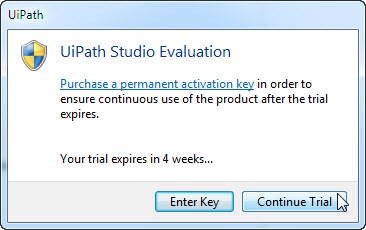
2) If you choose the second option, a registration dialog will open. Fill in your email and check Trial mode.
Note: when activating the trial, no code should be used-the code field must be empty.
3) Click on the Offline button.
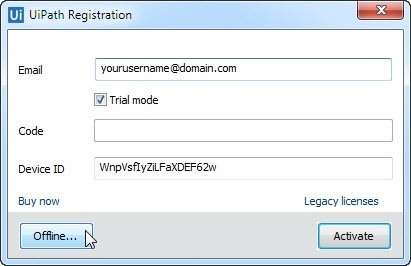
4) In the new dialog, save the generated data (Save to file button) to a txt file.
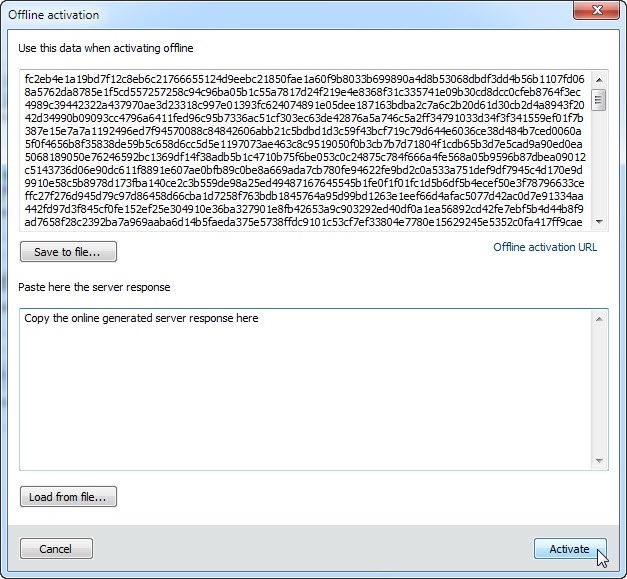
5) Send the file attached to email to another machine with no firewall/system security software that prevents the access to our online validation server. On the same machine, click on this Offline activation URL and copy the generated data from the txt file to the empty field in the page and click on Activate.
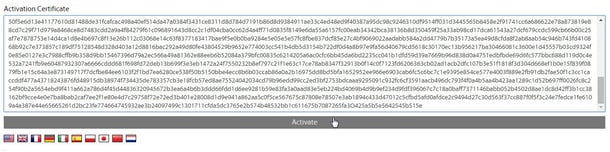
New data - the response from server - will be generated. Copy and save the generated response from server to a txt file and copy/send it via email back to the machine with the firewall restriction.
6) In the UiPath offline activation window click on Load from file button (please see the image at point 4 above), locate and open the file with the online generated response from server and click on the Activate button.
Your 60-day trial should now be activated.
Offline Activation - Paid License
1) In the same dialog mentioned at point 1) above click on Enter key.
Alternatively double click on Activate.exe in
C:\Program Files (x86)\UiPath Studio\v8\UiPath.
2) In the registration dialog fill in your email and copy the license code.
3) Further click on the Offline button
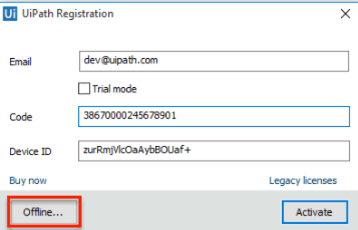
4) Follow the same indications described at steps 4 to 6 above to complete the offline activation process.

Thank you for sharing wonderful information with us to get some idea about that content.
ReplyDeleteUi Path Online Training
I have read your Uipath activation blog. Its very attractive and impressive. I like it your blog.....
ReplyDeleteThank you
https://www.kausalvikash.in/blog/the-truth-about-blockchain-in-robotic-process-automation/
https://www.kausalvikash.in/blog/rpa-transformation-in-accounting-auditing/
ReplyDeleteAn awesome blog for the freshers. Thanks for posting this information.
Uipath Certification Training
Uipath Online
Uipath Online Course
RPA Uipath Training in Hyderabad
Uipath Training in Bangalore
Uipath Foundation Training
Uipath Certification Course
Uipath Training in Hyderabad
Uipath Online Course
RPA Uipath Training
Uipath Training in Hyderabad
Thank you so much for this nice information. Hope so many people will get aware of this and useful as well. And please keep update like this.
ReplyDeleteVisit us: RPA Online Training
Visit us: Ui Path Developer Training
Learn Django online to understand backend architecture clearly.It focuses on guided instruction.This learn Django online improves coding clarity.It is dependable.
ReplyDelete"Excellent post! Join our devops training courses
ReplyDeleteto gain hands-on experience in Docker, Kubernetes, and infrastructure automation tools."
Python coding courses online provide practical learning through hands-on sessions. It explains programming workflows clearly. This python coding courses online enhances coding experience. Students practice real examples. Application logic is included. Script development is covered. Assignments are explained. It prepares learners for IT careers.
ReplyDeleteInsightful post! database modeling course
ReplyDeletehelps build strong database design skills with hands-on projects. Learn ER diagrams, normalization, and SQL to create efficient, scalable data systems and become industry-ready.
Great post! Our database modeling course
ReplyDeletehelps you design efficient databases with hands-on training in ER diagrams, normalization, and schema design.
Tableau Developer Training
ReplyDeleteTableau developer training is useful for analytics. This tableau developer training looks clear. Covers dashboards. Easy learning. Helpful guide.
Fantastic post! Master devops training courses
ReplyDeletecloud automation, container orchestration, and pipeline management with our practical DevOps training and real-world project exercises.
Salesforce Development Training
ReplyDeleteHow useful is Salesforce development training? I found this salesforce development training.
→ It’s good for advanced learning.
→ Thanks for the info.
Salesforce Dev Training
ReplyDelete{Is|How is} Salesforce dev training? Found this {salesforce dev training}. {Looks helpful|seems nice|looks clear}. {Any reviews?|Worth it?|Opinions?}
"Excellent share! Our data modeling class
ReplyDeletecovers ER diagrams, normalization, and relational design to help build strong data architecture skills."
Development skills improve with ab initio developer training as it focuses on ETL workflows. Graph creation is included. Transformations are explained. Real-time projects are covered. It supports developer careers.
ReplyDeleteA course that focuses on schema design, normalization, and relationships makes it easier to learn database design and modeling with real examples.
ReplyDeleteExcellent blog with useful learning information. This aws & devops course helps students and professionals gain practical knowledge in cloud and automation technologies.
ReplyDelete