In order to include an external assembly (.dll) in UiPath, you have to take the following steps:
1. Create a new Class Library C#/VB project
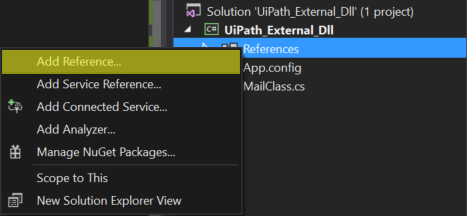
2. Right click on References ->Add Reference
3. Browse for the external dll and add it as a reference
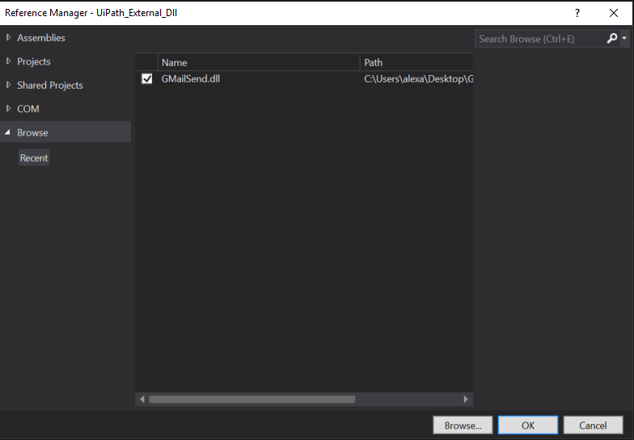
4. Do the same thing for System.Activities.Presentation, but search for it through to the list of already available assemblies
5. Create a class that implements IRegisterMetadata (from System.Activities.Presentation.Metadata namespace) to make your assembly visible to UiPath. This is not necesary if your assembly has activities.
public class RegisterMetadata : IRegisterMetadata{public void Register(){}}
6. You need to use at least one object from the external assembly to force loading it in UiPath
7. Build the project in Release
8. Follow this '
to learn how to create a custom package in which you have to include both the created and the referenced external assemblies.

thanks for sharing..it is informative blog
ReplyDeleterpa uipath training in hyderabad
It’s great blog to come across a every once in a while that isn’t the same out of date rehashed material. Fantastic read.
ReplyDeletemanual testing training in chennai |Manual testing course chennai
nice.............!
ReplyDeleteui path training
I really liked the way this topic was explained. The content is detailed without being overwhelming. Thanks for creating such a helpful resource.workday hcm course
ReplyDeleteBoomi courses provide in-depth knowledge of cloud-based integration and enterprise application management. These boomi courses cover process design, connectors, APIs, and data transformation techniques. Learners gain hands-on experience through practical assignments and projects. The courses help students develop professional integration skills.
ReplyDelete